
The “Download Tenements V3” APP uses ms.net4 as the programming language for the download program.
Some people have reported msvcp140.dll and runtime140.dll not found – Error.
I have not had that problem and cannot replicate thus I cannot create a video about the fix.
I sent people this email which they said fixed the problem.
It is a Windows Issue Due to Upgrades
“It is a Windows issue apparently due to upgrades to the Windows system, but like I said I am no expert on this problem.
You do not need to Uninstall and reinstall the APP program as far as I know the issue is that a program you have added or an Windows Upgrade has removed a file in the Windows program that is used to run other programs.
To Get the Fix
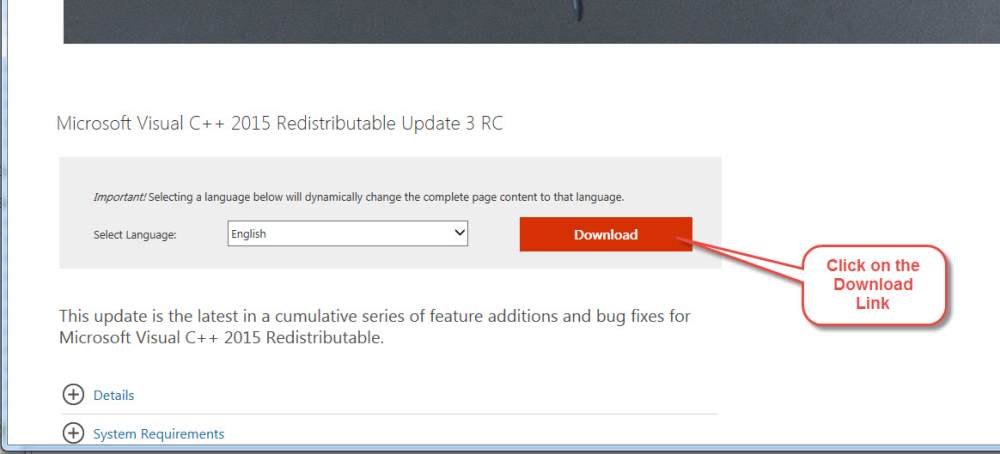
This is the link that you need to get the fix as of 21/04/20, choose between the
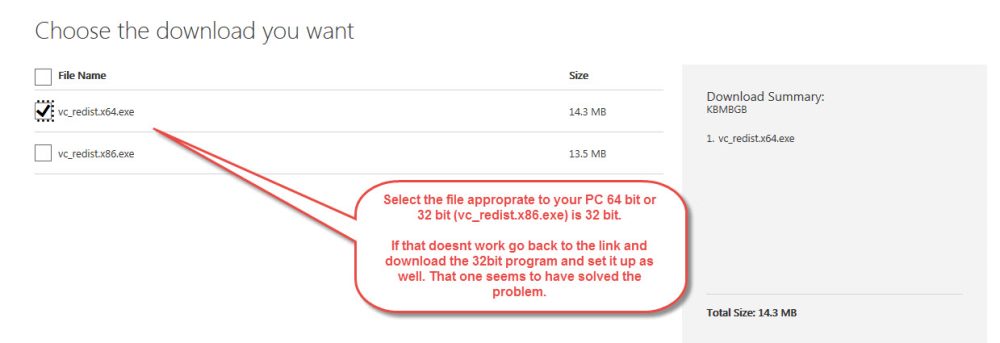
32bit (x86) or the 64bit (x64) or just install both if you have a 64bit (x64) based system.
You download the one most appropriate to your computer.
I understand The 32 bit is the most commonly used for app and program
development as it will run on both 32bit and 64bit PC’s so if the 64 bit one
doesn’t work then download the 32 bit one as well.
This is the page and scroll down past the Ad for the New Surface Pro 6 (Or whatever ad Microsoft has at the time on the page) to get to the download page, download and run the appropriate 2015 distributable.
https://www.microsoft.com/en-us/download/details.aspx?id=52685
Here is a link to a Pdf Document that you can print out and work with it you wish
Click to download FAQ – MCVCP140 and Runtime140 Error and Fix
As always – Contact us if you need further help.
Bill O’Connor
www.geomap-training-wa.com
“Helping you find Gold Nuggets in WA”
0407062505 Home 08 93051496
email support@geomap-training-wa.com